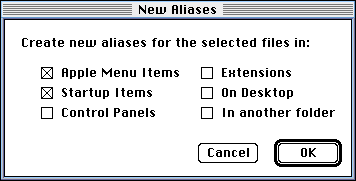
Finder Aliases Dialog
Finder Aliases DialogHere's another innovation brought to you by MacBird.
By Dave Winer, dwiner@well.com
Download the package and install it in Frontier 4.1b7 or greater.
Edit the Finder's menu bar, at system.menubars.MACS; add a command called Aliases..., and call finderAliases.runCard () from the script.
Let's say you want to put a new version of Frontier in the Startup Items folder and the Apple Menu Items folder. Here's how you do it:
- In the Finder, select the Frontier application icon.
- Choose the Aliases... command.
- Turn the first two checkboxes on, all others off, as shown in the picture above.
- Click on OK.
If an alias with the same name already exists, we confirm that you want to replace it.
Caveats/Discussion/Ideas
This is a planned new feature for Frontier 4.1. Please discuss on the Frontier-talk list. Ideas for Finder-based MacBird cards? Lots of fertile territory here.
|
This page was last built with Frontier on a Macintosh on Tue, Sep 17, 1996 at 1:20:52 PM. Thanks for checking it out! Dave |